Freshness Validations
Freshness Validations in Rudol detect issues related to when tables are updated. They ensure that data arrives on time, follows expected update patterns, and does not silently become stale or behave erratically.
Rudol supports two approaches for Freshness Validations:
- Known Schedule – rule-based validation against the update windows you define
- AI Pattern Detection – anomaly detection on historical update behavior
A table can have multiple Freshness Validations, but each validation uses only one approach.
Creating a Freshness Validation
A Freshness Validation monitors the timestamp of the last update of one or more tables. Rudol retrieves this information directly from the datasource metadata and, in most cases, considers both content changes (DML) and structural changes (DDL) as valid updates.
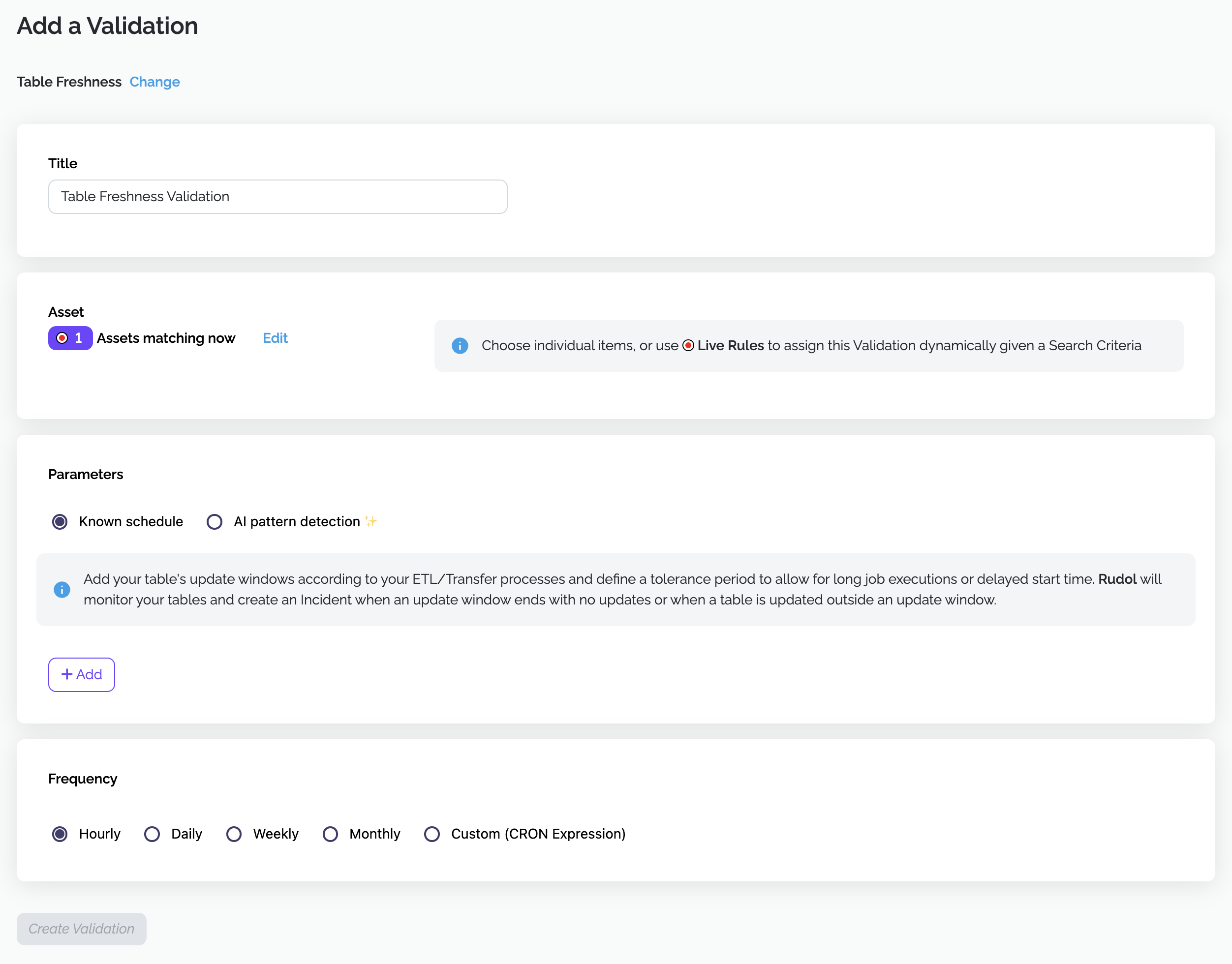
Assign a clear, descriptive name, for example:
- “Orders – Daily Load Freshness”
- “Marketing Tables – SLA Compliance”
Names should clearly express the expected update behavior.
Selecting Assets
Freshness Validations support the same asset selection model as other validations:
- Single Table
- Multiple Tables
- Live Rules (dynamic selection based on name, domain, technology, tags, owner)
Live Rules are evaluated at execution time. Tables that start matching are automatically included; tables that stop matching are excluded.
Evaluation method
Freshness behavior is defined by selecting one of the following evaluation methods.
Known Schedule
Choose Known schedule when you know the times your table is supposed to be updated — for example, “the sales ETL runs every weekday at 6:00 AM.” Rudol compares the table’s real last-update time against the update windows you define. If the table wasn’t updated when it should have been, the validation fails and a Data Quality Incident is created.
If your table doesn’t follow a fixed schedule and you’d rather have Rudol learn the pattern on its own, use AI Pattern Detection instead.
Defining update windows
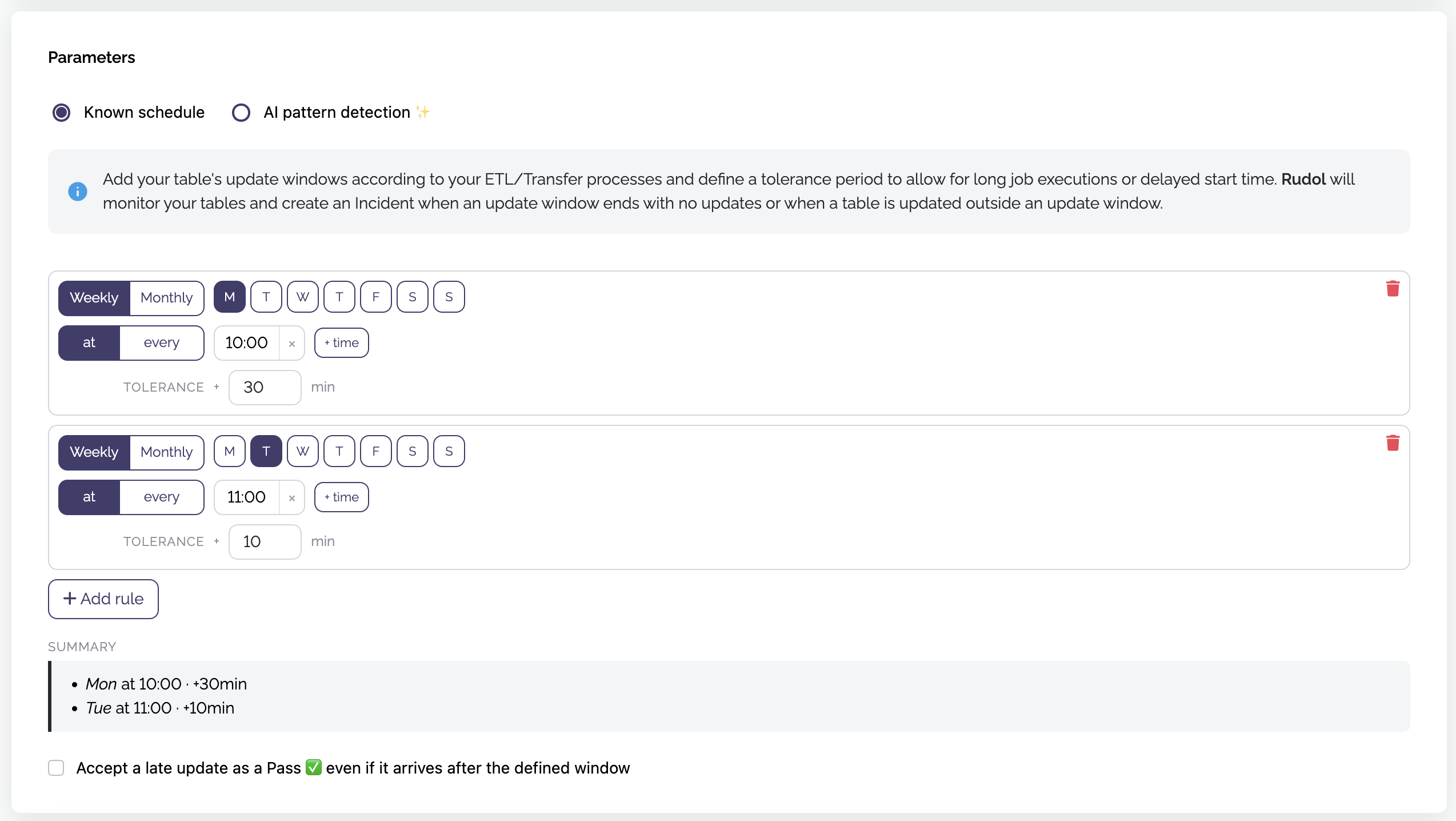
Each rule you add defines one or more update windows — the moments when the table is expected to be updated. Click Add rule and configure:
- Recurrence — Weekly or Monthly.
- Day(s) — click the day chips (M · T · W · T · F · S · S) to select the day(s) the update is expected.
- Time(s) — the expected update time (for example,
15:10). Use + time to add more times for the same day(s). - Tolerance (min) — how much later than the start time an update may still arrive and count as on time.
The tolerance is applied after the start time. A window runs from the start time to the start time plus the tolerance.
Example
- Wednesday at
15:10with5minutes tolerance → valid window: Wednesday 15:10 → 15:15 (UTC)
All times are evaluated in UTC.
As you configure, the Summary panel restates each window in plain language (for example, “Wed at 15:10 · +5min”), so you can confirm it matches your expectation before saving.
You can add several rules to cover tables that update at different times on different days. If a table updates more than once inside a valid window, the window is considered fulfilled and no incident is created.
Set the tolerance to cover the normal variability of your process. If your ETL sometimes finishes at 15:11 and sometimes at 15:40, a 5-minute tolerance will produce false alarms — widen it to match reality.
When does the validation fail?
By default, Known Schedule is strict: it cares both that the update happens and that it happens inside the expected window. Rudol creates a Data Quality Incident when either of the following occurs:
- A window closes without an update — you expected data by 15:15 and the table wasn’t touched.
- The table is updated outside of any window — for example, an unexpected update at 20:00, when data was only expected at 15:10.
Accept a late update as a Pass
Enable “Accept a late update as a Pass — even if it arrives after the defined window” when what matters is that the data eventually arrives, and updates outside the scheduled time (manual loads, backfills, reprocessing) are normal in your operation and shouldn’t raise incidents.
With this option enabled, the validation only asks one question:
Did an expected window close without the table being updated since that window started?
The difference between the two modes:
| Situation | Default (unchecked) | Accept late update (checked) |
|---|---|---|
| Updated inside the window | Pass ✅ | Pass ✅ |
| Window closed with no update | Fail ❌ | Fail ❌ |
| Updated outside any window | Fail ❌ | Pass ✅ |
| Missed window, still not updated | Recovers on the next run ✅ | Keeps failing ❌ until an update arrives |
| Late update, after the window closed | Fail ❌ | Pass ✅ (clears the previous failure) |
Two behaviors worth knowing when this option is enabled:
- The alert persists. As long as the table hasn’t received a new update, each run keeps failing — this reflects the real state (“this data is still stale”) instead of alerting only once.
- Any update after the window started counts, even if it arrives after the tolerance. Here the tolerance defines when the window begins to be evaluated, not a hard deadline.
Most teams that get false alarms for “updated outside the window” want this option enabled.
AI Pattern Detection
Use AI Pattern Detection when update behavior is variable or not strictly scheduled.
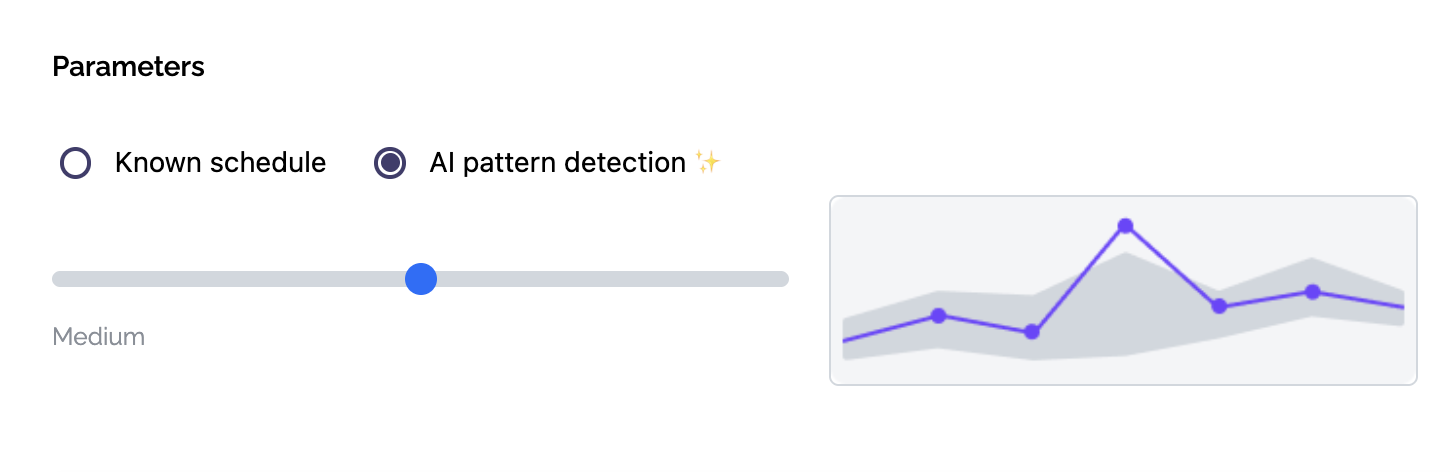
In this mode, Rudol applies anomaly detection to the metric time between updates, learning normal behavior over time. The metric is defined as:
time_between_updates = timestamp(update_n) - timestamp(update_n-1)
- Measured in seconds
- Calculated every time Rudol detects a change in the table’s last update timestamp
- The first update is ignored; training starts from the second update onward
Examples
- Table updates at 10:00 and 10:15 → time between updates = 900 seconds
- Table updates at 01:00 and 05:00 → time between updates = 14,400 seconds
Both unusually long and unusually short intervals can be considered anomalies.
Training Mode
Once created, the validation enters Training Mode. Rudol collects historical samples to learn normal behavior.
- Requires ~500 samples over at least 3 weeks.
- The threshold is not fixed; it depends on execution frequency and data stability.
- You must choose frequency carefully to avoid excessively long training periods.
- When enough samples are gathered, the validation transitions automatically to Prediction Mode.
Execution Frequency
Freshness Validations can run:
- Hourly
- Daily
- Weekly
- Monthly
- Using a custom CRON expression
The chosen frequency determines how often Rudol checks the table (and, for AI Pattern Detection, how fast the model collects training samples). All assigned assets, including those selected through Live Rules, use the same frequency.
For Known Schedule, configure a custom CRON expression that runs the validation a few minutes after the expected update window closes, to minimize detection time. For example, if a table should be updated between 13:00 and 13:30 (UTC), a good CRON expression is:
35 * * * ? *
This runs the validation at 13:35, meaning you’ll be notified of a missing update within 5 minutes of the window closing.
For Known Schedule, choose a frequency that checks at least as often as your windows occur. Windows that are missed while the validation isn’t running for a long time are not recovered retroactively.
Interpreting Validation Results
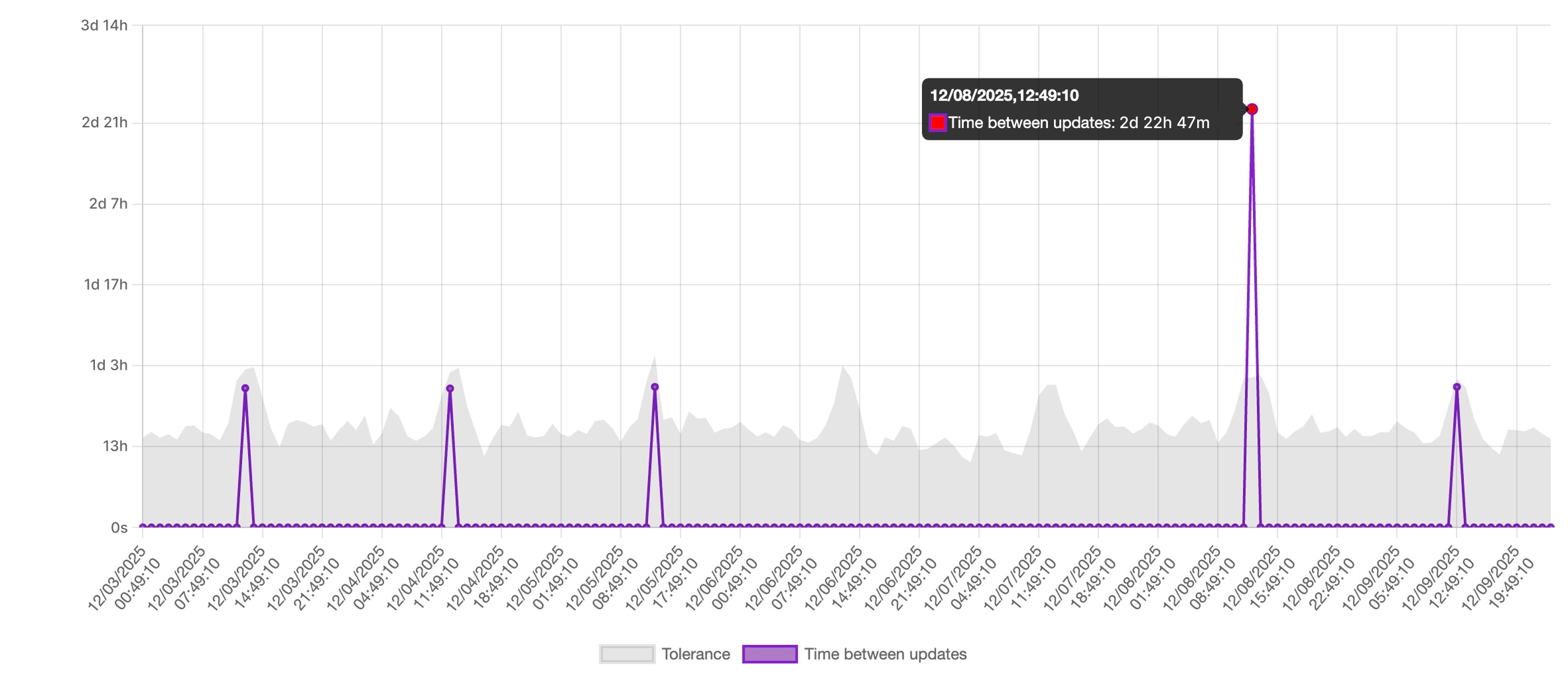
For AI Pattern Detection, each validation displays a time-series chart:
- Purple line: observed time between updates
- Grey band: AI-generated expected range
- Red dots: detected anomalies that generate incidents
The Y-axis is rendered dynamically (seconds, minutes, hours, or days) depending on magnitude. Each spike represents a detected update; its height reflects the elapsed time since the previous update.
Understanding Anomalies
An anomaly indicates that the observed time between updates falls outside the expected range—either:
- The table updated too late, or
- The table updated too frequently
In both cases, Rudol creates a Data Quality Incident and sends alerts to subscribed users and configured integrations.
Alerts and Notifications
When an anomaly is detected alerts are sent automatically to:
- All users subscribed to the validation (email + in-app notifications)
- Configured integration channels: Slack, Microsoft Teams, Google Chat
This ensures immediate visibility across operational and analytics teams.
Handling Spikes
If a sudden change is known to be valid, like a backfill or a batch reprocessing, you can mark the anomaly as “Not an incident” from the Incident view.
This action:
- Feeds corrective feedback to the AI model
- Helps the system adjust expectations faster
- Avoids repeated false positives in the future
There is no need to manually reset the training process: Rudol retrains continuously as it accumulates more data.